✨ Prompting Best Practices
Tell Copilot Chat what you need. Prompts are how you ask Copilot to create, summarize, review, research, or help you complete a task.
Think of prompting as a conversation. Use clear, natural language and provide the context you would give to a trusted colleague or assistant.
What You'll Learn
By the end of this guide, you will be able to:
- Recognize the four ingredients of an effective prompt
- Ground Copilot in the right work information
- Set clear expectations for the response
- Turn a simple request into a useful, actionable prompt
NOTE
You do not need special syntax or technical language. Start with a clear request, add relevant context and sources, then describe the response you want.
Prepare for Your Next Meeting
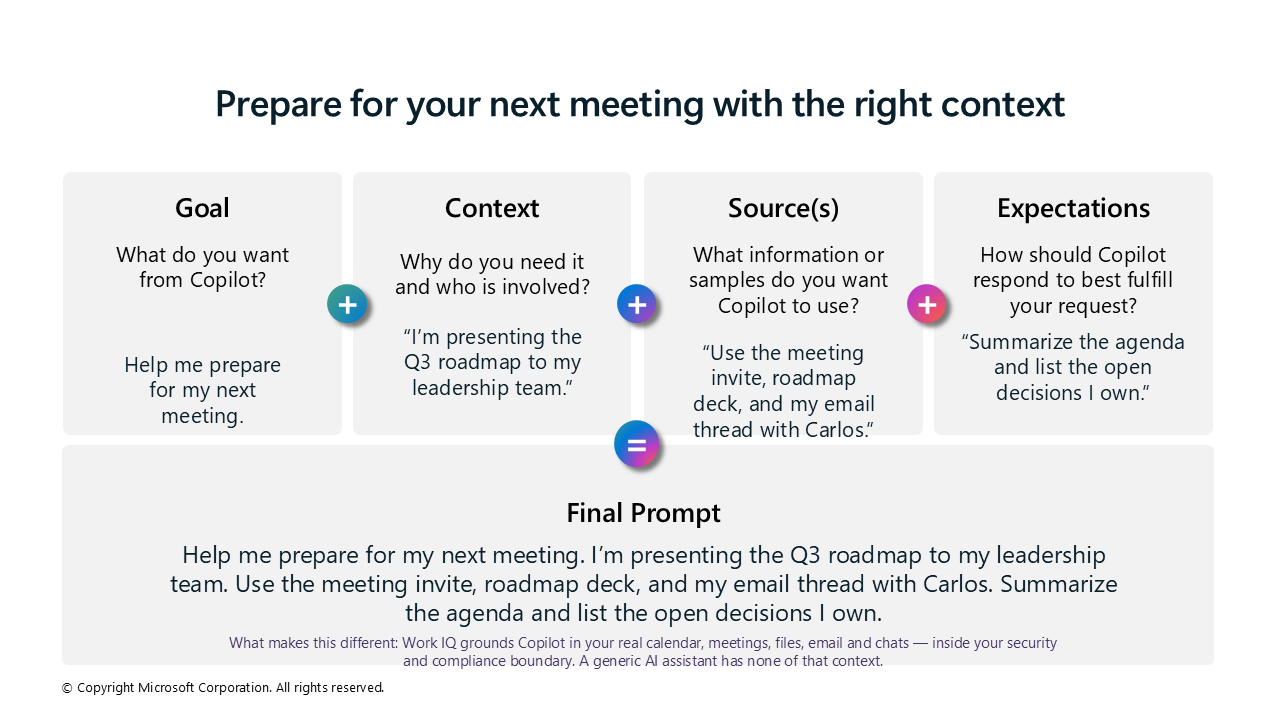
A basic request becomes much more useful when you add the desired outcome, business context, named sources, and expected response format.
The following practical example shows how to build a meeting-preparation prompt using all four ingredients. It also demonstrates how Work IQ can ground Copilot in your real work information, including your calendar, meetings, files, email, and chats.
TIP
Before your next meeting, name at least one specific source in your prompt. This helps Copilot produce an answer that is current, relevant, and easier to verify.
What Can You Ask Copilot to Do?
Copilot can help you with many common work tasks.
Review text
Check this product launch rationale for inconsistencies.Summarize information
Write a session abstract for this presentation.Create engaging content
Create a value proposition for our new product using [Product Information].Research a topic
Give me the latest industry news about generative AI.TIP
Be conversational, be clear, and do not overthink your first prompt. You can refine the response through follow-up questions.
The Four Ingredients of a Successful Prompt
To get a more relevant and useful response, include four key ingredients:
| Ingredient | Question to answer |
|---|---|
| Goal | What response or outcome do you want from Copilot? |
| Context | Why do you need it, and who is involved? |
| Source(s) | Which files, meetings, messages, links, or examples should Copilot use? |
| Expectations | How should Copilot structure and present the response? |
1. Goal
State what you want Copilot to do. Put the goal first, or near the beginning of your prompt.
Help me write an email to inform a customer about a product change.2. Context
Explain why you need the response, who is involved, and any important circumstances.
The customer is not a global administrator, so I need to explain the change in terms that are relevant to their role.3. Source(s)
Direct Copilot to the information it should use. Naming specific sources is one of the most effective ways to improve the result.
Use the product-change announcement at [Change URL].Sources can include:
- A document, presentation, or workbook
- A meeting invitation or transcript
- An email thread or Teams conversation
- A web page or other reference
- An example of the style or format you want
4. Expectations
Describe what a good response looks like. Specify the format, length, tone, audience, or sections you need.
Provide clear and concise information in a professional tone.IMPORTANT
Expectations are easy to overlook. Without them, Copilot must decide how long, detailed, formal, or structured the response should be.
Put the Ingredients Together
Combine the four ingredients into one natural, conversational prompt.
Help me write an email to inform a customer about a product change.
The customer is not a global administrator, so I need to explain the
change in terms that are relevant to their role. Use the product-change
announcement at [Change URL]. Provide clear and concise information in
a professional tone.
Here is how the prompt works:
| Ingredient | Prompt content |
|---|---|
| Goal | Help me write an email to inform a customer about a product change. |
| Context | The customer is not a global administrator, so I need to explain the change in terms that are relevant to their role. |
| Source | Use the product-change announcement at [Change URL]. |
| Expectations | Provide clear and concise information in a professional tone. |
A Reusable Prompt Pattern
Use this structure as a starting point:
Goal: [What do you want Copilot to do?]

Context: [Why do you need it, and who is involved?]

Sources: [Which files, meetings, messages, links, or examples should Copilot use?]

Expectations: [What format, length, tone, or level of detail do you need?]
You can also write the same ingredients as one natural paragraph:
[Goal]. [Context]. Use [sources]. Respond with [expectations].What Good Looks Like
Before using the response, check:
- Is the goal clear?
- Did you provide enough context?
- Did you name the most relevant sources?
- Did you describe the expected format and level of detail?
- Are important facts supported by sources you can verify?
- Is the response appropriate for the intended audience?
Key Takeaway
Effective prompting combines:
Goal + Context + Source(s) + ExpectationsStart with the outcome you need, ground Copilot in the right work information, and describe what a useful response should look like. Then review the result, verify important facts, and refine the prompt through conversation.